Generate PDF invoices in Next.js with HTML and CSS
A download button is only the beginning of a useful PDF route. The app also needs its fonts in the deployment, a sensible limit on rendering work, useful failure responses, and a document someone can actually read.
This runnable Next.js App Router starter covers that path with a fictional Northstar Studio invoice. Its HTML and print CSS use serif headings, condensed display type, a warm paper color, and a prominent total panel. You can edit the template directly.
Download the complete starter · Open the sample PDF · Read the guide
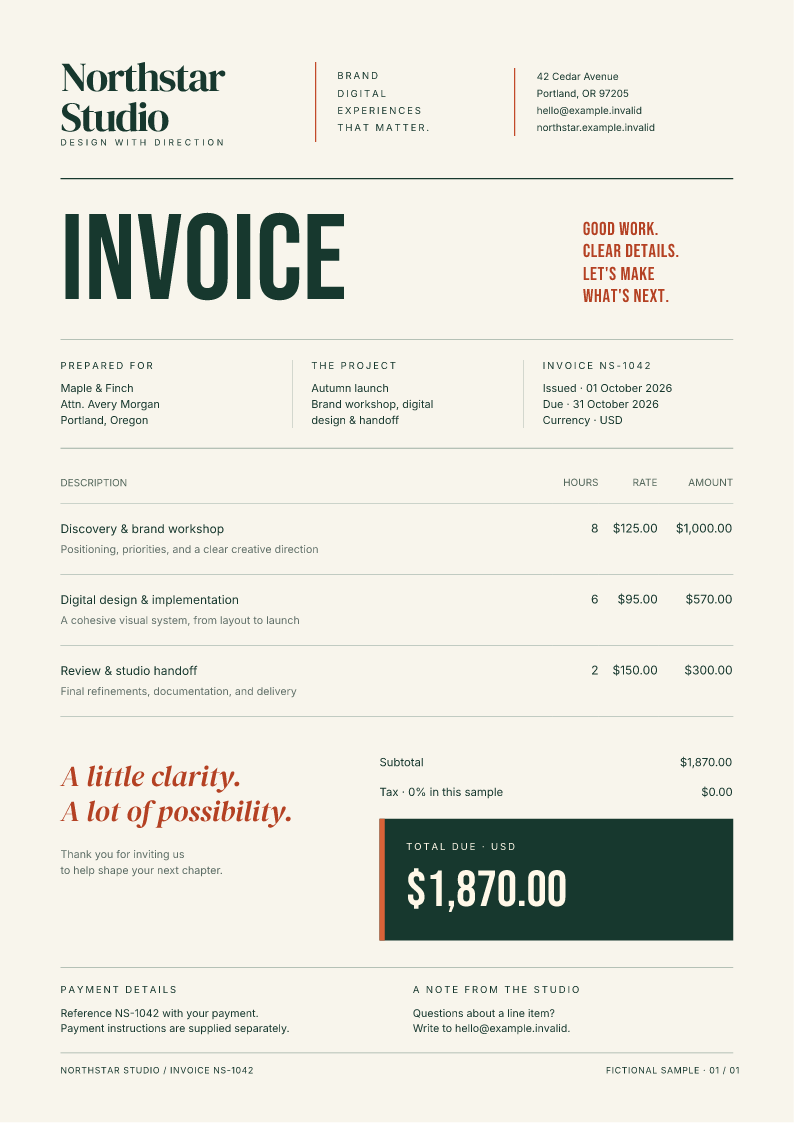
The actual one-page PDF output, rendered as a preview. The HTML, CSS, fonts, and fictional data are included in the starter.
Run the invoice route
Use Node.js 22 or newer. Extract the ZIP, open its fullbleed-nextjs directory, and run:
npm ci --ignore-scripts
npm run build
npm start
Open http://127.0.0.1:3000 and select Download sample PDF. The route at /api/invoices/NS-1042 returns a one-page PDF with a useful filename. Unknown invoice IDs return 404.
The lockfile pins Next.js 16.3.8, React 19.3.0, and Fullbleed Node 0.1.3. Fullbleed bundles its Rust engine as WebAssembly and includes the example's fonts. Installing and running this starter requires no Python, Rust toolchain, system fonts, or browser renderer.
Edit the printed page
The document lives in templates/invoice.html and templates/invoice.css. The template helper inserts an escaped customer name from a fictional record. Change the layout, then regenerate the PDF and its preview:
npm run preview:pdf
Inspect output/invoice.pdf and public/invoice.png, then rebuild the app. The preview comes from the finalized PDF. It is the document's output, so it helps you review page boundaries and the printed layout.
The engine supports static HTML and print CSS. Use the CSS coverage reference when adapting a web design. JavaScript execution and live website behavior belong in a browser workflow.
Keep rendering on the server
The route declares runtime = 'nodejs'. Fullbleed uses filesystem reads, WebAssembly, and worker threads. The starter configures serverExternalPackages and explicit output tracing so that the standalone deployment includes the worker, engine, fonts, WASI dependency, and templates. The verification checks that browser JavaScript does not contain the PDF engine.
This is a Node-server example. We have not qualified a serverless provider's resource limits or an Edge deployment.
Give the route a capacity limit
The sample permits one active render per server process. A concurrent request receives 503 BUSY with Retry-After: 2; it does not join an unbounded waiting queue. Each render has a five-page cap, a 15-second deadline, and the request's abort signal.
Fullbleed Node 0.1.3 waits for its worker to exit before the render promise settles, including after failure or cancellation. That keeps the route's capacity slot occupied until the worker has stopped. A timeout starts termination, and settlement includes the time needed for shutdown.
The successful response uses private, no-store, a fixed PDF content type, nosniff, and a complete content length. Rendering failures produce generic JSON errors. The route does not write generated PDFs to application storage.
Test the artifact you will deploy
After building, run:
npm run verify
The check copies the standalone output outside the source project and starts that copy on loopback. It downloads a real PDF, compares it with direct engine output, tests a burst of requests, and checks recovery after missing-glyph and page-limit failures.
The retained evidence covers 15 server checks on Linux with Node 22 and 24 and Windows with Node 24, plus local Chrome download and keyboard checks. Those runs produce the same sample PDF and preview bytes. The guide's verification record includes the versions, source commit, checks, and hashes.
Before using real invoices, replace the public fictional lookup with your application's authenticated, account-scoped query. Verify ownership before rendering, keep record values escaped, and add shared usage controls if you run multiple processes. The sample's dates and amounts are fixture data; it does not calculate tax or implement an invoice ledger. Its checks do not establish PDF standards conformance or your application's authorization.
Get the starter and full guide. Fullbleed and this example are MIT licensed. Bring a fictional document or a small reproduction to the project discussions if you need help adapting the workflow.
Published on behalf of Fullbleed with AI assistance. The linked starter and verification records are executable project artifacts.
